 zomars
fb1828c8f9
zomars
fb1828c8f9
commit 3ea36a4b9626c99bf343caf8bacb756a09699990 Author: zomars <zomars@me.com> Date: Tue Feb 28 13:26:58 2023 -0700 Revert "One more time" This reverts commit fd8b559a135820567f40dbb47a4b4dfc2ef44755. commit fd8b559a135820567f40dbb47a4b4dfc2ef44755 Author: zomars <zomars@me.com> Date: Tue Feb 28 13:00:49 2023 -0700 One more time commit e8fe71d795a74c00eb59139389df454a2ff8d807 Author: zomars <zomars@me.com> Date: Tue Feb 28 12:40:28 2023 -0700 Fix? commit 84517e6ddbca2248b72d6cd912c2c32f9efb743c Author: zomars <zomars@me.com> Date: Tue Feb 28 12:38:20 2023 -0700 Revert "Consolitades setup step" This reverts commit 5e8d1983cc5ac309fa6875a2fee77aa6287b7151. commit 5e8d1983cc5ac309fa6875a2fee77aa6287b7151 Author: zomars <zomars@me.com> Date: Tue Feb 28 12:34:52 2023 -0700 Consolitades setup step commit 8e732c4cf9662daf84ab8c3acf702292fb6dd4e5 Merge: 00485a9d312f2c1f43Author: zomars <zomars@me.com> Date: Tue Feb 28 12:25:18 2023 -0700 Merge remote-tracking branch 'upstream/main' commit 00485a9d3313d415906141493febdbf56dff649d Author: zomars <zomars@me.com> Date: Tue Feb 28 12:08:29 2023 -0700 Update action.yml commit 95c30af12f91b4cc310f0a61b5d584591bebc3ee Author: zomars <zomars@me.com> Date: Tue Feb 28 12:05:42 2023 -0700 Update action.yml commit e56d8a73e25c664afb0066aedc792250abc3b86a Author: zomars <zomars@me.com> Date: Tue Feb 28 11:09:21 2023 -0700 Removed setup commit ff83d88ac6cd7338204ce93a84c285189bd6d352 Author: zomars <zomars@me.com> Date: Tue Feb 28 10:54:30 2023 -0700 Is this redundant? commit b40b65e8da1238abe097913a3422f24be342c27e Merge: 774ba24ae29e9bd0eeAuthor: zomars <zomars@me.com> Date: Tue Feb 28 10:53:25 2023 -0700 Merge remote-tracking branch 'upstream/main' commit 774ba24aeb1d0fde55963fe6aecdf3fddddfa497 Merge: 4508120449c794bac1Author: zomars <zomars@me.com> Date: Tue Feb 28 10:18:53 2023 -0700 Merge remote-tracking branch 'upstream/main' commit 450812044137b665eb90422daf58e8e042cf1492 Author: Omar López <zomars@me.com> Date: Tue Feb 28 07:35:02 2023 -0700 Update action.yml commit c1d6937f4c22039138284985a4da723ac4ea7803 Author: Omar López <zomars@me.com> Date: Tue Feb 28 07:19:52 2023 -0700 Update action.yml commit de3ec8b5d8a94ae3cf9aa1e7f3accdf5a8101159 Author: Omar López <zomars@me.com> Date: Tue Feb 28 07:05:39 2023 -0700 Update action.yml commit b6f6382f1554394ea743acc92824fd7e222ee97d Author: Omar López <zomars@me.com> Date: Tue Feb 28 06:30:55 2023 -0700 Update action.yml commit e79c03c7a31930dd99ccd9f5cdc156b808c869a5 Author: Omar López <zomars@me.com> Date: Tue Feb 28 06:06:51 2023 -0700 Update action.yml commit 55cc76f526aefa83a8275b06ad3f55b6d201e8a6 Author: zomars <zomars@me.com> Date: Mon Feb 27 21:09:05 2023 -0700 Update pr.yml commit ffc5d245613f1364e302a4c91e32490d8621b987 Merge: 2c41c16af4eecd4220Author: zomars <zomars@me.com> Date: Mon Feb 27 21:03:22 2023 -0700 Merge branch 'up-main' commit 2c41c16afc2f1c4c0ad77f1064b7e1369146ac48 Author: zomars <zomars@me.com> Date: Mon Feb 27 20:23:13 2023 -0700 Updates webhook response commit cc5ef15b431226d97d3128e8460e9b6f505cba44 Author: zomars <zomars@me.com> Date: Mon Feb 27 20:11:35 2023 -0700 Typefix commit 50be9255cb8f839c2e8914e03a963c63b7dd5948 Author: Joe Au-Yeung <65426560+joeauyeung@users.noreply.github.com> Date: Mon Feb 27 15:45:40 2023 -0500 Fix - add team members to emails (#7207) * On booking add team members & translation * Add team members to round robin create * Only update calendars on reschedule if there is a calendar reference * Send email on reschedules * Send team email on cancelled event * Add team members to calendar event description * Clean up * Convert other emails to organizer & teams * Type check fixes * More type fixes * Change organizer scheduled input to an object * early return updateCalendarEvent * Introduce team member type * Fix type errors * Put team members before attendees * Remove lodash cloneDeep * Update packages/core/EventManager.ts Co-authored-by: Omar López <zomars@me.com> * Remove booking select object * Revert "Remove booking select object" This reverts commit 9f121ff4ebbaec9a0643111f96c5337b930ddd5b. * Refactor email manager (#7270) Co-authored-by: zomars <zomars@me.com> * Type change * Remove conditional check for updateAllCalendarEvents --------- Co-authored-by: zomars <zomars@me.com> commit c7d22a851c584600952e62f8a383a52bee1ad87e Author: Omar López <zomars@me.com> Date: Mon Feb 27 12:39:26 2023 -0700 Update viewer.tsx (#7428) commit db5b802a157e4e4abdf5cb55149eb9a4d4e19a12 Author: Joe Au-Yeung <65426560+joeauyeung@users.noreply.github.com> Date: Mon Feb 27 13:47:21 2023 -0500 Add destination calendar name to DestinationCalendarSelector (#6701) * Add destination calendar name * Type fix * Search through calendars only for destination calendar credential * Refactor get connected calendars * Clean up --------- Co-authored-by: zomars <zomars@me.com> commit 27512b16d2e189826a7719cbf7cec1fd55ad419a Author: Carina Wollendorfer <30310907+CarinaWolli@users.noreply.github.com> Date: Mon Feb 27 02:24:43 2023 -0500 Team Workflows (#7038) Co-authored-by: Hariom Balhara <hariombalhara@gmail.com> Co-authored-by: CarinaWolli <wollencarina@gmail.com> Co-authored-by: zomars <zomars@me.com> Co-authored-by: Peer Richelsen <peeroke@gmail.com> commit 7b47956a34b9e474c9667ce0f1dbc9a45991a991 Author: Udit Takkar <53316345+Udit-takkar@users.noreply.github.com> Date: Sun Feb 26 00:45:05 2023 +0530 feat: get country code from ip geolocation (#6880) * feat: get coutnry code from ip geolocation Signed-off-by: Udit Takkar <udit.07814802719@cse.mait.ac.in> * fix: create new api route for fetching code Signed-off-by: Udit Takkar <udit.07814802719@cse.mait.ac.in> * chore: replace city with country Signed-off-by: Udit Takkar <udit.07814802719@cse.mait.ac.in> * refactor: create hook for country Signed-off-by: Udit Takkar <udit.07814802719@cse.mait.ac.in> --------- Signed-off-by: Udit Takkar <udit.07814802719@cse.mait.ac.in> commit 658ccc651743c81ab08b4a8a5fecdfd3149ef518 Author: Esaú Morais <55207584+esau-morais@users.noreply.github.com> Date: Sat Feb 25 16:07:41 2023 -0300 Update settings back button redirect link (#7403) * fix(schedule): close on click #7143 * fix(EventSetupTab): validLocations length will always match validLocations length #7138 * fix(SettingsLayout): go back to right route #7379 commit b5849ca30fde97a986cb697220b47712c24834e3 Author: Omar López <zomars@me.com> Date: Fri Feb 24 20:57:49 2023 -0700 Zomars/cal 884 paid events not sending the link (#7318) * WIP * Sends correct emails for paid bookings * Update PaymentService.ts * Update webhook.ts * Update webhook.ts commit a57369d521b3e0c278e72a4002842a2267a72636 Author: zomars <zomars@me.com> Date: Mon Feb 27 17:56:55 2023 -0700 Whitespace!! commit 4d74fa89bf3967696ffd72191b387ad48cb29240 Author: zomars <zomars@me.com> Date: Mon Feb 27 16:36:08 2023 -0700 fix commit fe1724accc81a46b12c1f6a3cdf1669908a4df42 Author: zomars <zomars@me.com> Date: Mon Feb 27 16:23:24 2023 -0700 Build fix commit 0ce2c654cefb505bc0772cbd424c2d1887e009c1 Author: zomars <zomars@me.com> Date: Mon Feb 27 16:17:48 2023 -0700 LFG commit d8be3316799ed7b032f9539e2c98d938872e7483 Author: zomars <zomars@me.com> Date: Mon Feb 27 15:59:52 2023 -0700 Please commit d27f36f8896269f1b4083d4e5fb5443bfb86e49a Author: zomars <zomars@me.com> Date: Mon Feb 27 15:41:33 2023 -0700 Pls commit eb4d01eff2210a087bd69b0756784c2ad9b0647b Author: zomars <zomars@me.com> Date: Mon Feb 27 15:28:01 2023 -0700 Test commit c3fd449cfda8ba3c8a43718591f44a36fa95e4ae Author: zomars <zomars@me.com> Date: Mon Feb 27 14:07:52 2023 -0700 a commit 21cc8834157c9cca6c6c49ea54f1b227a29264db Author: zomars <zomars@me.com> Date: Sat Feb 25 09:35:42 2023 -0700 Fingers crossed commit f674d7f99b752b9a5cf6c167d10b744d2b7401af Author: zomars <zomars@me.com> Date: Sat Feb 25 09:31:44 2023 -0700 cache-build not skipping commit 3cbbead2f2707488c53ac9f982aa8e704ff93e33 Author: zomars <zomars@me.com> Date: Sat Feb 25 09:16:16 2023 -0700 One more time commit 20672bfbc8f039ae5e699465bf7cab27dde8ba1b Author: zomars <zomars@me.com> Date: Sat Feb 25 09:00:51 2023 -0700 Caching is hard commit a6ff8974a4571da10fac48f2555ed1f92f9b0b9d Author: zomars <zomars@me.com> Date: Sat Feb 25 08:45:09 2023 -0700 Running out of ideas commit d7577926add336d806509231c35f41f5bf826f22 Author: zomars <zomars@me.com> Date: Sat Feb 25 08:31:54 2023 -0700 Possible caching conflicts commit 1cc8e6e8977f255f0095c0f03b5ad11195220a35 Author: zomars <zomars@me.com> Date: Sat Feb 25 08:05:35 2023 -0700 e2e commit 4636609be2efe6a028d1faae180f992376021862 Author: zomars <zomars@me.com> Date: Sat Feb 25 08:03:08 2023 -0700 Cache fixes commit 6db3b1afbe3d2b1ccecce6d83f5410f1ffa4453f Author: zomars <zomars@me.com> Date: Sat Feb 25 07:49:50 2023 -0700 Test commit 8d2587bc3a72daaba4e74b2ee7878199451b3577 Author: zomars <zomars@me.com> Date: Fri Feb 24 21:20:27 2023 -0700 db-cache fixes commit 0991c54f36a47d05b0baab036ab3ed1039c59154 Author: zomars <zomars@me.com> Date: Fri Feb 24 21:07:13 2023 -0700 Adds skipping steps commit e8e437ba0178c5cab54613e1c1f1cac1cd0d73ad Author: zomars <zomars@me.com> Date: Fri Feb 24 21:04:38 2023 -0700 Fixes commit d5912767bd3a5b57c9150e0b851f51b2d9f6750b Author: zomars <zomars@me.com> Date: Fri Feb 24 20:48:15 2023 -0700 Cache fixes commit 88aa6d560ecb9e8f4603344454fabd68bc3fa990 Author: zomars <zomars@me.com> Date: Fri Feb 24 20:17:23 2023 -0700 Fix commit 594d8b5efe0f320de13862dba552e8fffb9d2cde Author: zomars <zomars@me.com> Date: Fri Feb 24 20:17:23 2023 -0700 Fix commit 0b29558a6c248dce961cb462a46f5047ef917545 Author: zomars <zomars@me.com> Date: Fri Feb 24 20:12:45 2023 -0700 Fix commit f80259232c6b6f58556d2f39212329d87c3468ca Author: zomars <zomars@me.com> Date: Fri Feb 24 20:09:53 2023 -0700 Fix commit 73b02c2c920e2f0f9996d1cf6580fb4195ec69e4 Author: zomars <zomars@me.com> Date: Fri Feb 24 20:04:07 2023 -0700 Fix commit 4c375c89523651779b47f0fc53e0effb78300a08 Author: zomars <zomars@me.com> Date: Fri Feb 24 19:59:15 2023 -0700 FFS commit fbe8eb969f4a22840b8a518ee87892b488964638 Author: zomars <zomars@me.com> Date: Fri Feb 24 19:56:59 2023 -0700 Fixes commit 619b26de0205c4094966fe36b40ca37def743309 Author: zomars <zomars@me.com> Date: Fri Feb 24 19:53:39 2023 -0700 Fix commit 737a29b80a53b0fdda953fa9c9068da60b018fcb Author: zomars <zomars@me.com> Date: Fri Feb 24 19:51:38 2023 -0700 Fix commit a9cf1fd3830306c246283debfb8654f011053688 Author: zomars <zomars@me.com> Date: Fri Feb 24 19:49:20 2023 -0700 Another fix commit 0770c5b8141dc819bdfb065ba41793edfb9660d2 Author: zomars <zomars@me.com> Date: Fri Feb 24 19:45:41 2023 -0700 Fix commit efb9d0ccd48446ddf66eb84bd45dedb36132e025 Author: zomars <zomars@me.com> Date: Fri Feb 24 19:43:42 2023 -0700 Fix env setter commit 5cda52f1f95cbfcaf34f8b196101834e6adcda1a Author: zomars <zomars@me.com> Date: Fri Feb 24 19:23:11 2023 -0700 Add env-cache commit ad8e36891e3adb9621202a054e188727f9a2beac Author: zomars <zomars@me.com> Date: Fri Feb 24 18:56:27 2023 -0700 Create env file workflow

Cal.com (formerly Calendso)
The open-source Calendly alternative.
Learn more »
Slack
·
Website
·
Issues
·
Roadmap
















About The Project
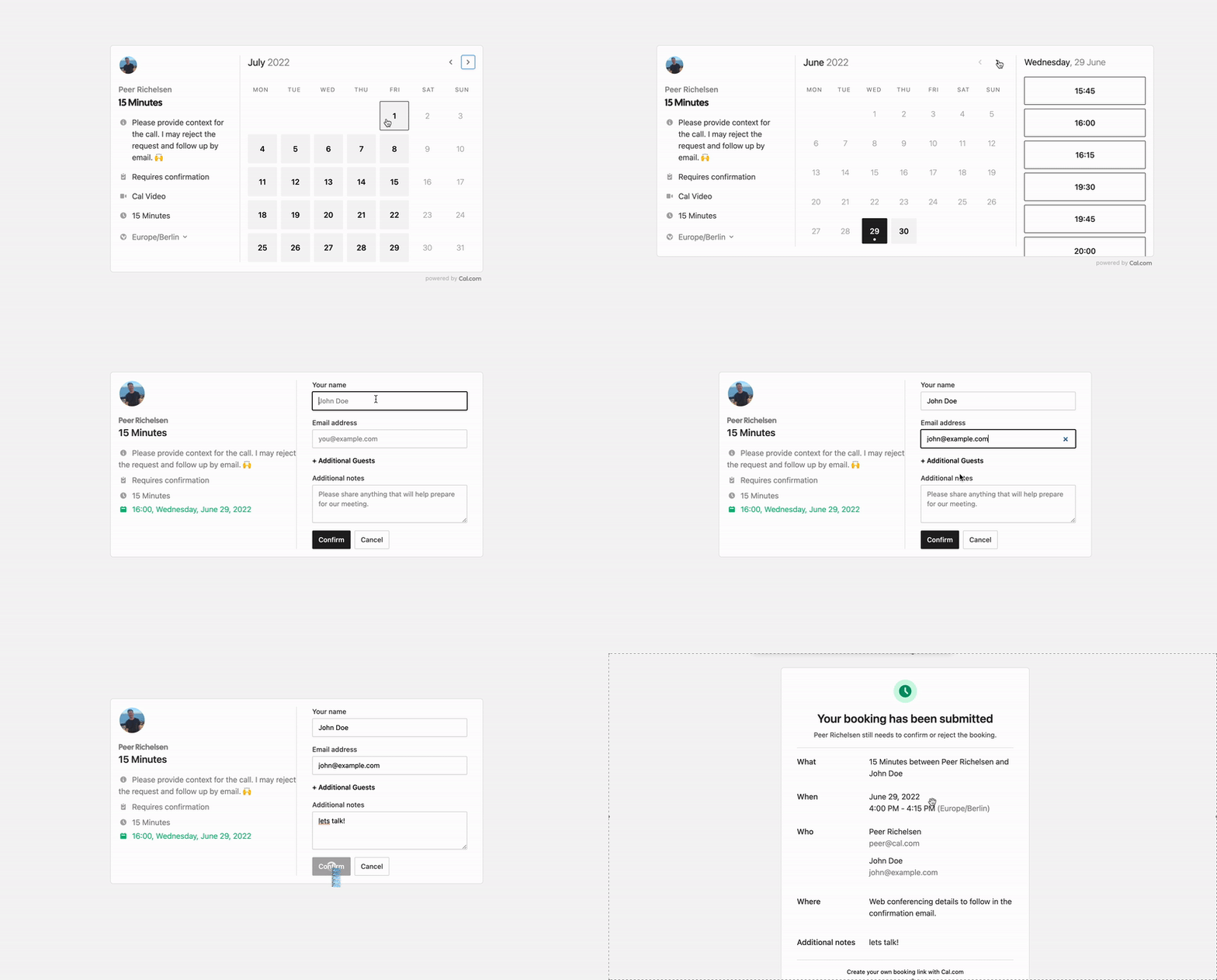
Scheduling infrastructure for absolutely everyone
The open source Calendly alternative. You are in charge of your own data, workflow and appearance.
Calendly and other scheduling tools are awesome. It made our lives massively easier. We're using it for business meetings, seminars, yoga classes and even calls with our families. However, most tools are very limited in terms of control and customisations.
That's where Cal.com comes in. Self-hosted or hosted by us. White-label by design. API-driven and ready to be deployed on your own domain. Full control of your events and data.
Recognition
Hacker News
Product Hunt


Built With
Stay Up-to-Date
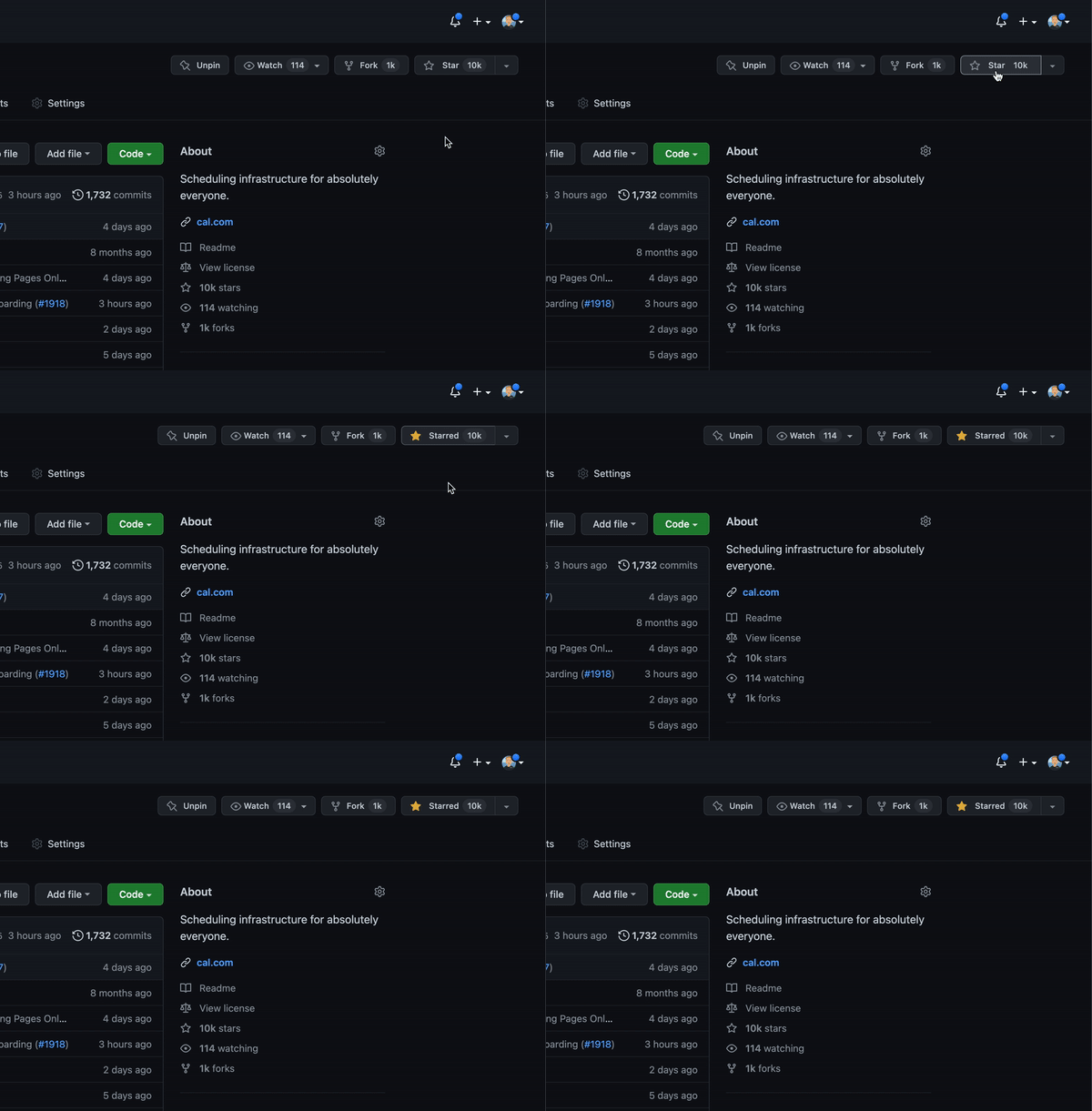
Cal officially launched as v.1.0 on 15th of September, however a lot of new features are coming. Watch releases of this repository to be notified for future updates:
Getting Started
To get a local copy up and running, please follow these simple steps.
Prerequisites
Here is what you need to be able to run Cal.
- Node.js (Version: >=15.x <17)
- PostgreSQL
- Yarn (recommended)
If you want to enable any of the available integrations, you may want to obtain additional credentials for each one. More details on this can be found below under the integrations section.
Development
Setup
-
Clone the repo into a public GitHub repository (or fork https://github.com/calcom/cal.com/fork). If you plan to distribute the code, keep the source code public to comply with AGPLv3. To clone in a private repository, acquire a commercial license)
git clone https://github.com/calcom/cal.com.git -
Go to the project folder
cd cal.com -
Install packages with yarn
yarn -
Set up your .env file
- Duplicate
.env.exampleto.env - Use
openssl rand -base64 32to generate a key and add it underNEXTAUTH_SECRETin the .env file. - Use
openssl rand -base64 24to generate a key and add it underCALENDSO_ENCRYPTION_KEYin the .env file.
- Duplicate
Quick start with yarn dx
- Requires Docker and Docker Compose to be installed
- Will start a local Postgres instance with a few test users - the credentials will be logged in the console
yarn dx
Development tip
Add
NEXT_PUBLIC_DEBUG=1anywhere in your.envto get logging information for all the queries and mutations driven by trpc.
echo 'NEXT_PUBLIC_DEBUG=1' >> .env
Manual setup
-
Configure environment variables in the
.envfile. Replace<user>,<pass>,<db-host>,<db-port>with their applicable valuesDATABASE_URL='postgresql://<user>:<pass>@<db-host>:<db-port>'If you don't know how to configure the DATABASE_URL, then follow the steps here to create a quick DB using Heroku
-
Create a free account with Heroku.
-
Create a new app.

-
In your new app, go to
Overviewand next toInstalled add-ons, clickConfigure Add-ons. We need this to set up our database.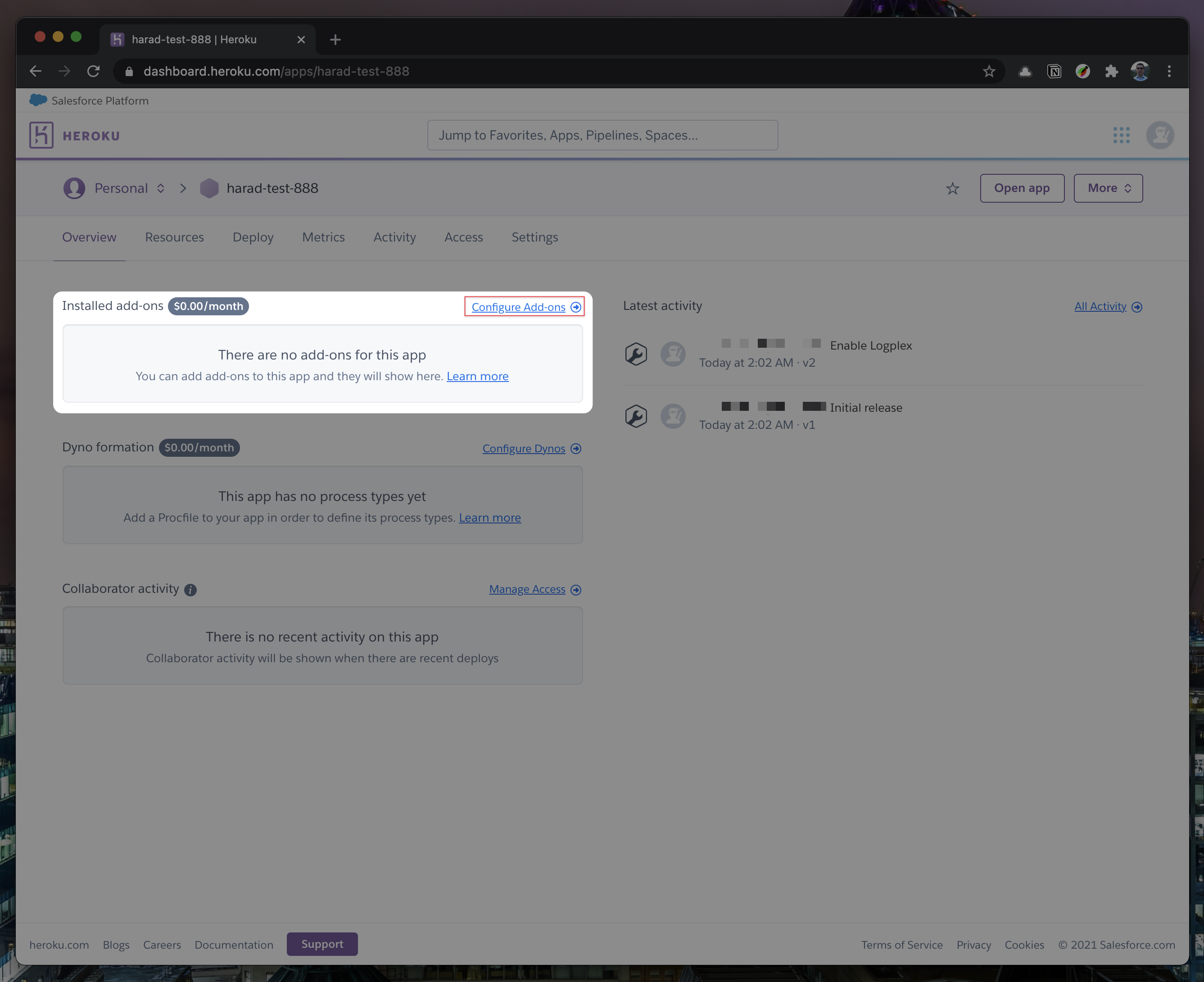
-
Once you clicked on
Configure Add-ons, click onFind more add-onsand search forpostgres. One of the options will beHeroku Postgres- click on that option.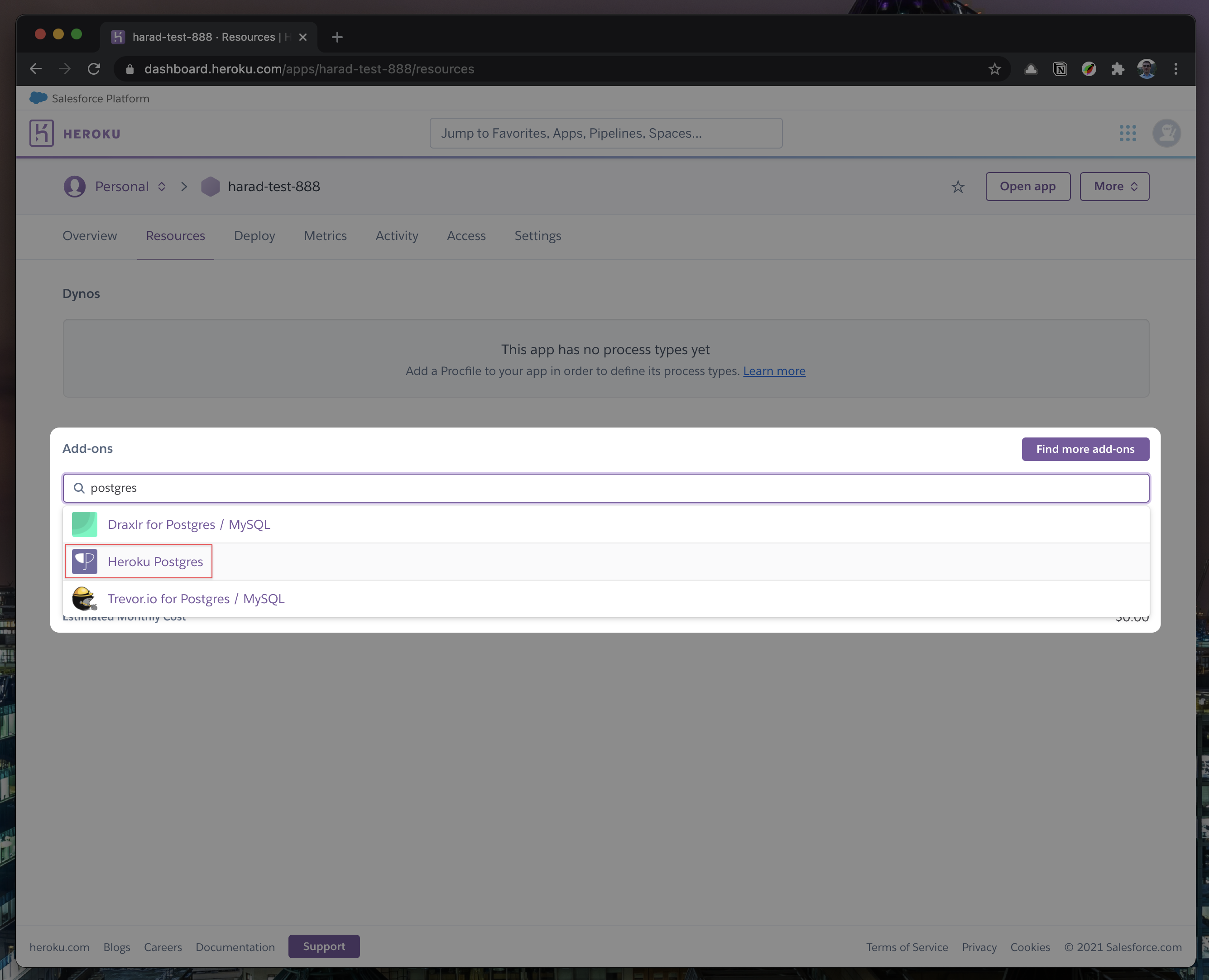
-
Once the pop-up appears, click
Submit Order Form- plan name should beHobby Dev - Free.
-
Once you completed the above steps, click on your newly created
Heroku Postgresand go to itsSettings.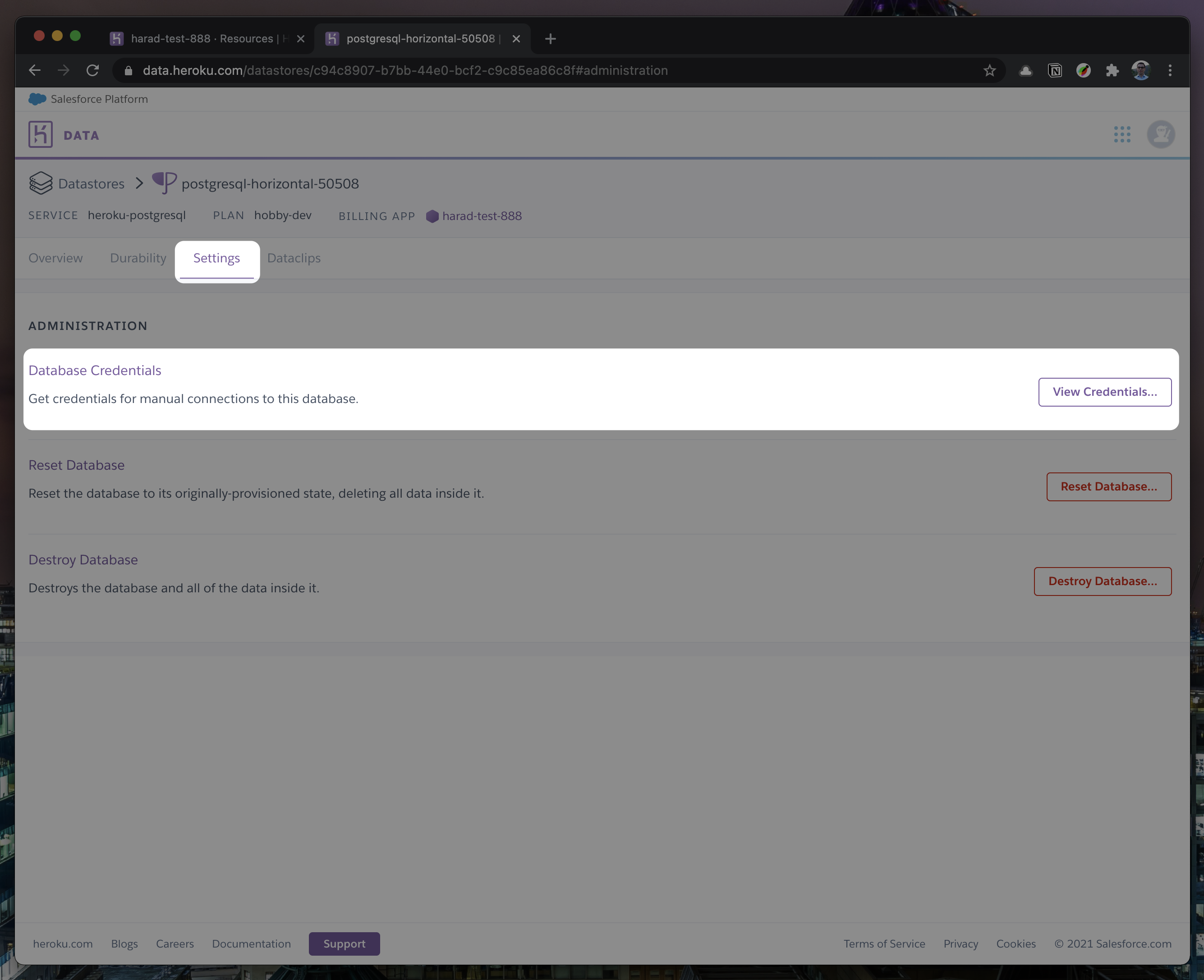
-
In
Settings, copy your URI to your Cal.com .env file and replace thepostgresql://<user>:<pass>@<db-host>:<db-port>with it.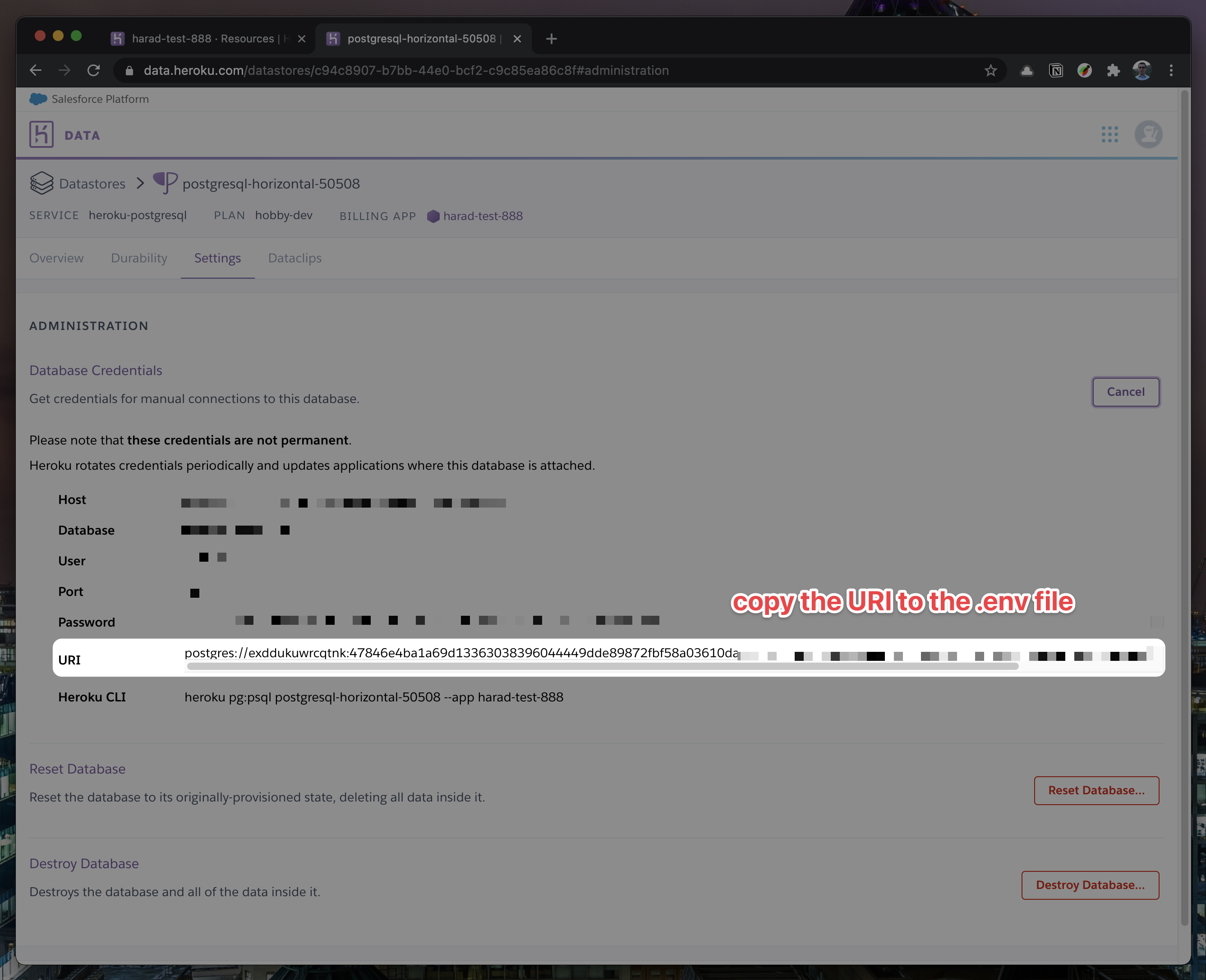

-
To view your DB, once you add new data in Prisma, you can use Heroku Data Explorer.
-
-
Set a 32 character random string in your .env file for the
CALENDSO_ENCRYPTION_KEY(You can use a command likeopenssl rand -base64 24to generate one). -
Set up the database using the Prisma schema (found in
packages/prisma/schema.prisma)yarn workspace @calcom/prisma db-deploy -
Run (in development mode)
yarn dev
Setting up your first user
-
Open Prisma Studio to look at or modify the database content:
yarn db-studio -
Click on the
Usermodel to add a new user record. -
Fill out the fields
email,username,password, and setmetadatato empty{}(remembering to encrypt your password with BCrypt) and clickSave 1 Recordto create your first user.New users are set on a
TRIALplan by default. You might want to adjust this behavior to your needs in thepackages/prisma/schema.prismafile. -
Open a browser to http://localhost:3000 and login with your just created, first user.
E2E-Testing
Be sure to set the environment variable NEXTAUTH_URL to the correct value. If you are running locally, as the documentation within .env.example mentions, the value should be http://localhost:3000.
# In a terminal just run:
yarn test-e2e

# To open last HTML report run:
yarn playwright show-report test-results/reports/playwright-html-report
Upgrading from earlier versions
-
Pull the current version:
git pull -
Check if dependencies got added/updated/removed
yarn -
Apply database migrations by running one of the following commands:
In a development environment, run:
yarn workspace @calcom/prisma db-migrate(this can clear your development database in some cases)
In a production environment, run:
yarn workspace @calcom/prisma db-deploy -
Check for
.envvariables changesyarn predev -
Start the server. In a development environment, just do:
yarn devFor a production build, run for example:
yarn build yarn start -
Enjoy the new version.
Deployment
Docker
The Docker configuration for Cal is an effort powered by people within the community.
If you want to contribute to the Docker repository, reply here.
The Docker configuration can be found in our docker repository.
Issues with Docker? Find your answer or open a new discussion here to ask the community.
Cal.com, Inc. does not provide official support for Docker, but we will accept fixes and documentation. Use at your own risk.
Heroku

Railway

You can deploy Cal on Railway using the button above. The team at Railway also have a detailed blog post on deploying Cal on their platform.
Vercel
Currently Vercel Pro Plan is required to be able to Deploy this application with Vercel, due to limitations on the number of serverless functions on the free plan.
Render

Roadmap

See the roadmap project for a list of proposed features (and known issues). You can change the view to see planned tagged releases.
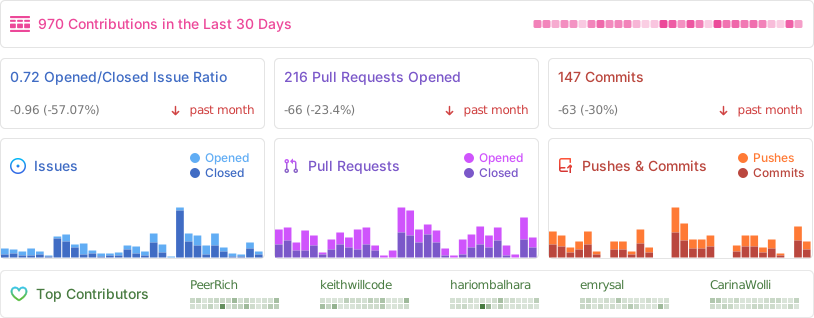
Repo Activity
Contributing
Please see our contributing guide.
Good First Issues
We have a list of help wanted that contain small features and bugs which have a relatively limited scope. This is a great place to get started, gain experience, and get familiar with our contribution process.
Bounties

Translations
Don't code but still want to contribute? Join our slack and join the #i18n channel and let us know what language you want to translate.


Enabling Content Security Policy
- Set CSP_POLICY="non-strict" env variable, which enables Strict CSP except for unsafe-inline in style-src . If you have some custom changes in your instance, you might have to make some code change to make your instance CSP compatible. Right now it enables strict CSP only on login page and on other SSR pages it is enabled in Report only mode to detect possible issues. On, SSG pages it is still not supported.
Integrations
Obtaining the Google API Credentials
- Open Google API Console. If you don't have a project in your Google Cloud subscription, you'll need to create one before proceeding further. Under Dashboard pane, select Enable APIS and Services.
- In the search box, type calendar and select the Google Calendar API search result.
- Enable the selected API.
- Next, go to the OAuth consent screen from the side pane. Select the app type (Internal or External) and enter the basic app details on the first page.
- In the second page on Scopes, select Add or Remove Scopes. Search for Calendar.event and select the scope with scope value
.../auth/calendar.events,.../auth/calendar.readonlyand select Update. - In the third page (Test Users), add the Google account(s) you'll using. Make sure the details are correct on the last page of the wizard and your consent screen will be configured.
- Now select Credentials from the side pane and then select Create Credentials. Select the OAuth Client ID option.
- Select Web Application as the Application Type.
- Under Authorized redirect URI's, select Add URI and then add the URI
<Cal.com URL>/api/integrations/googlecalendar/callbackand<Cal.com URL>/api/auth/callback/googlereplacing Cal.com URL with the URI at which your application runs. - The key will be created and you will be redirected back to the Credentials page. Select the newly generated client ID under OAuth 2.0 Client IDs.
- Select Download JSON. Copy the contents of this file and paste the entire JSON string in the .env file as the value for GOOGLE_API_CREDENTIALS key.
Adding google calendar to Cal.com App Store
After adding Google credentials, you can now Google Calendar App to the app store. You can repopulate the App store by running
cd packages/prisma
yarn seed-app-store
You will need to complete a few more steps to activate Google Calendar App. Make sure to complete section "Obtaining the Google API Credentials". After the do the following
- Add extra redirect URL
<Cal.com URL>/api/auth/callback/google - Under 'OAuth concent screen', click "PUBLISH APP"
Obtaining Microsoft Graph Client ID and Secret
- Open Azure App Registration and select New registration
- Name your application
- Set Who can use this application or access this API? to Accounts in any organizational directory (Any Azure AD directory - Multitenant)
- Set the Web redirect URI to
<Cal.com URL>/api/integrations/office365calendar/callbackreplacing Cal.com URL with the URI at which your application runs. - Use Application (client) ID as the MS_GRAPH_CLIENT_ID attribute value in .env
- Click Certificates & secrets create a new client secret and use the value as the MS_GRAPH_CLIENT_SECRET attribute
Obtaining Zoom Client ID and Secret
- Open Zoom Marketplace and sign in with your Zoom account.
- On the upper right, click "Develop" => "Build App".
- On "OAuth", select "Create".
- Name your App.
- Choose "User-managed app" as the app type.
- De-select the option to publish the app on the Zoom App Marketplace.
- Click "Create".
- Now copy the Client ID and Client Secret to your .env file into the
ZOOM_CLIENT_IDandZOOM_CLIENT_SECRETfields. - Set the Redirect URL for OAuth
<Cal.com URL>/api/integrations/zoomvideo/callbackreplacing Cal.com URL with the URI at which your application runs. - Also add the redirect URL given above as a allow list URL and enable "Subdomain check". Make sure, it says "saved" below the form.
- You don't need to provide basic information about your app. Instead click at "Scopes" and then at "+ Add Scopes". On the left, click the category "Meeting" and check the scope
meeting:write. - Click "Done".
- You're good to go. Now you can easily add your Zoom integration in the Cal.com settings.
Obtaining Daily API Credentials
- Open Daily and sign into your account.
- From within your dashboard, go to the developers tab.
- Copy your API key.
- Now paste the API key to your .env file into the
DAILY_API_KEYfield in your .env file. - If you have the Daily Scale Plan set the
DAILY_SCALE_PLANvariable totruein order to use features like video recording.
Obtaining HubSpot Client ID and Secret
- Open HubSpot Developer and sign into your account, or create a new one.
- From within the home of the Developer account page, go to "Manage apps".
- Click "Create app" button top right.
- Fill in any information you want in the "App info" tab
- Go to tab "Auth"
- Now copy the Client ID and Client Secret to your .env file into the
HUBSPOT_CLIENT_IDandHUBSPOT_CLIENT_SECRETfields. - Set the Redirect URL for OAuth
<Cal.com URL>/api/integrations/hubspot/callbackreplacing Cal.com URL with the URI at which your application runs. - In the "Scopes" section at the bottom of the page, make sure you select "Read" and "Write" for scope called
crm.objects.contacts - Click the "Save" button at the bottom footer.
- You're good to go. Now you can see any booking in Cal.com created as a meeting in HubSpot for your contacts.
Workflows
Setting up SendGrid for Email reminders
- Create a SendGrid account (https://signup.sendgrid.com/)
- Go to Settings -> API keys and create an API key
- Copy API key to your .env file into the SENDGRID_API_KEY field
- Go to Settings -> Sender Authentication and verify a single sender
- Copy the verified E-Mail to your .env file into the SENDGRID_EMAIL field
- Add your custom sender name to the .env file into the NEXT_PUBLIC_SENDGRID_SENDER_NAME field (fallback is Cal.com)
Setting up Twilio for SMS reminders
- Create a Twilio account (https://www.twilio.com/try-twilio)
- Click ‘Get a Twilio phone number’
- Copy Account SID to your .env file into the TWILIO_SID field
- Copy Auth Token to your .env file into the TWILIO_TOKEN field
- Copy your Twilio phone number to your .env file into the TWILIO_PHONE_NUMBER field
- Add your own sender id to the .env file into the NEXT_PUBLIC_SENDER_ID field (fallback is Cal)
- Create a messaging service (Develop -> Messaging -> Services)
- Choose any name for the messaging service
- Click 'Add Senders'
- Choose phone number as sender type
- Add the listed phone number
- Leave all other fields as they are
- Complete setup and click ‘View my new Messaging Service’
- Copy Messaging Service SID to your .env file into the TWILIO_MESSAGING_SID field
- Create a verify service
- Copy Verify Service SID to your .env file into the TWILIO_VERIFY_SID field
License
Distributed under the AGPLv3 License. See LICENSE for more information.
Acknowledgements
Special thanks to these amazing projects which help power Cal.com:


Cal.com is an open startup and Jitsu (an open-source Segment alternative) helps us to track most of the usage metrics.